The Devs are not the problem
When a release lands and the UX and UI do not match what was designed, it is tempting to point at engineering. Why are the margins off? Why has that button behaviour changed? Why does this look like a new component? Nine times out of ten the issue is not laziness or incompetence. It is a gap. Into the gap falls Missing tokens. Ambiguous guidance. Fragmented libraries. Out-of-date specs. That gap creates interpretation, and interpretation creates inconsistency.
A good design system closes the gap. It gives designers and developers a shared source of truth and a common language, so the work ships faster, looks right, and behaves predictably. This article explains where the gap comes from, what it costs, and how to fix it in practical steps that empower developers rather than blaming them.
Why the mismatch happens
Design assets drift from production. Screens are shared as static images, not living components. Handover files do not reflect the true, coded behaviour of focus states, errors, loading, or empty states. Developers fill in the blanks and the blanks multiply.
Details are missing or unclear. If the foundations — colour, spacing, typography and motion — are not clearly defined and connected between design and code, then each implementation becomes a best guess. These shared foundations are sometimes called design tokens: the named values that make sure both sides use the same definitions. Without them, you end up with twelve button greys, five slightly different radii, and a spacing scale that nobody can explain.
Components exist but are not ready for production. Many Figma components, even interactive ones, do not tell the full story. Without a solid handover process that includes documentation on accessibility, expected behaviour, and usage guidelines, developers are left to fill in the gaps. A component without these details is not production-ready — it is just a visual reference. That uncertainty forces developers to interpret intent, and interpretation leads to divergence.
Documentation is thin. Guidance might say “use the primary button for main actions,” but it rarely covers when or where to use each element, how it fits into the bigger UX picture, or what happens at the edges. Developers and designers both end up filling in the gaps, each interpreting intent differently. Without shared clarity on placement, behaviour, and exceptions, everyone does their own thing — and what emerges is not a design system but a collection of loosely related parts. The team builds three different patterns that all feel almost right, and now the codebase carries the cost.
There is no governance. Anyone can add variants or override tokens. Decisions live in Slack threads, not in versioned docs. Audits, reviews and regular cross-disciplinary check-ins are vital to success. These sessions help teams identify what is working, what is not, and what to do about it. Without that structure, everyone ends up playing a different version of the same game — and you would not play a board game without a shared set of rules. The system cannot be trusted, so people route around it.
None of these are developer problems. They are system problems. Solve the system and the product gets better for everyone.
What a system gives developers
A clear framework for implementing design. Tokens expose colour, type, spacing, elevation and motion as named values. Components expose interactions and states with predictable properties — the configuration options developers use to control component behaviour. Developers do not need to ask which grey to use or how a button handles loading—they follow a clear, documented framework that ensures design intent is implemented consistently.
Speed without guesswork. With a production-ready library, a ticket that once meant recreating a modal from a componentshot now means composing a layout from known parts. Delivery time falls, quality and brand consistency rise, and the team has more time for real product work. Visual and behavioural patterns remain consistent across features and platforms, strengthening both user trust and brand recognition.
Accessibility by default. If accessible patterns are baked into components, then focus order, ARIA attributes, colour contrast and error messaging do not rely on heroic effort. The system carries the standard, not the individual engineer. Building accessibility in from the start ensures alignment with the Web Content Accessibility Guidelines (WCAG) and the European Accessibility Act (EAA). It also saves time and cost by avoiding remedial rework to achieve compliance later in development.
Clear escape hatches. Well-designed systems define how and when to extend. If a team needs an experimental variant, they can add it under a proposal process with versioning, rather than forking a one-off that will haunt the codebase for years.
Shared language across functions. Tokens and components become the lingua franca between design, engineering and content. When you say “text-normal on surface-raised at spacing-300,” everyone knows what that means, in Figma and in code.
How to close the gap, practically
You do not need to boil the ocean. Start small, make it real, and let momentum do the heavy lifting. Treat the design system as an iterative effort — add element by element, component by component, improving as you go. Each iteration builds confidence, strengthens collaboration, and lays the groundwork for broader adoption.
1. Audit reality, not intentions.
Run a quick inventory of the live product. Count button colours, border radii, spacing increments, input styles, and error patterns. Capture screenshots and code samples. The audit is your business case and your backlog.
2. Establish a minimal token set.
Create a neutral scale, brand colours, semantic text and surface tokens, spacing, radius and elevation. Map them to design variables and to code tokens at the same time. Publish them in both places. From day one, design and development should reference the same names.
3. Ship one production-ready component.
Pick a high-value workhorse like Button or Text Input. Define states, keyboard behaviour, validation, error messaging, and responsive rules. Write short, clear guidance. Release it behind a feature flag and migrate one real flow. Celebrate the time saved.
4. Document with purpose.
Documentation should answer three questions: When do I use it, how do I use it, and what does good look like. Think of it as a quick-start guide rather than a detailed user manual. Keep it short, visual, and example-led. Include do and do nots, code snippets, and accessibility notes. Avoid essays.
5. Set light-touch governance.
Define who approves changes, how proposals are made, and how versions are released. Use a change log. Treat the system like a product with owners, backlog, and metrics. The goal is trust. If people trust the system, they use it.
6. Integrate the dev workflow.
Publish packages to your registry, add lint rules for tokens, expose Storybook or equivalent for visual checks, and run visual regression tests on key components. Make the quality easy to maintain. Make the right thing the easy thing.
7. Measure adoption and impact.
Track the percentage of components used, the number of duplicated variants removed, and the time to deliver comparable features. Share the wins. When the system saves two days on a release, tell that story.
Real-world example
I consulted for an organisation, and met with the design, development, and product teams to uncover why delivery felt chaotic. As soon as I asked, “What’s the issue?”, the room erupted — blame flew between disciplines. Developers said design didn’t understand implementation, designers said devs ignored intent, and the product manager was caught in the middle, frustrated by missed targets and conflicting priorities.
Once the dust settled, the real problem became clear. A large agency had built the new site, but now the in-house teams needed to maintain and optimise it without a shared framework. Designers didn’t understand how complex seemingly small changes were, and developers couldn’t see the purpose behind those changes.
I started small. A review revealed inconsistent typography, so I defined a clear typographic scale — from headings to disclaimers — and documented it on a single one-page PDF. Each element showed size, leading, colour, and usage. Sitting down with the developers, we implemented it together. The feedback was instant: “I’m not sure what you’ve done, but the site looks much better!”
That simple guide became the foundation of a shared design framework. It gave both teams a reference for design and build, reducing ambiguity and boosting confidence. From there, we added components and patterns incrementally, improving collaboration and efficiency. The product manager saw KPIs and performance metrics not just met but exceeded. Starting small and proving value turned chaos into clarity.
Objections you might hear
“We do not have time for a system.”
You already have one. It is the inconsistent one you are paying for in slowed delivery, increased bugs and user confusion. A small, well-aimed change saves time quickly.
“Our product is too unique.”
Great. A system does not remove uniqueness, it creates the guardrails that make uniqueness safe. Define the foundations, then extend intentionally.
“Design will lose creativity.”
Creativity flourishes with constraints. When the basics are standard, designers spend their energy on solving real problems, not redrawing the same button again.
“Engineering prefers to build from scratch.”
Engineers prefer clarity, speed and quality. A trustworthy library that is easy to extend beats copy-pasting code from last quarter’s feature every time.
Key Take Away
Do not blame developers when the UX and UI does not match the design. Blame the gap, then close it. A lean design system — tokens that map to code, a handful of production-ready components, crisp documentation and light-touch governance — removes guesswork, speeds delivery, and raises quality. Start small, ship something real, and let the results build your case.TL;DR
Featured work
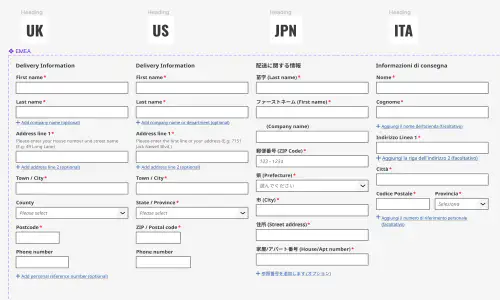
ion Design System
Global design system for RS Group
- Design System
- E-commerce
- B2B
Created a scalable, accessible design system adopted across RS Group’s global digital teams, aligning Figma and Tailwind through design tokens.
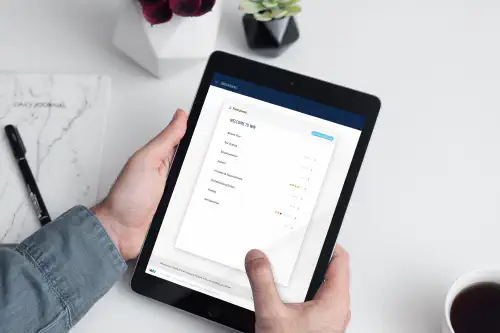
Client Onboarding
KYC onboarding for wealth management — faster, clearer, fewer errors
- SaaS
- Fintech
- Onboarding
- KYC
Co-created a configurable, advisor-led onboarding flow that reduced friction for investors and managers, and achieved 100% pre‑launch adoption with pilot customers.